
The Education & Examination Division would like to say THANK YOU to the Driving Safety Providers who have already began reporting student completion data in the new Online Licensing System.
We wanted to share with you a few important reminders that will help avoid error codes:
- Before performing a transaction in your Online Licensing Services account, please read the Training Guide for Uploading Driving Safety Certificate Data.
- If you receive error messages, always refer to the training guide, then review the data entered into each field to make sure it is correct.
- Do not use any commas when completing the spreadsheet–not even if you use quotation marks for the data in that field.
- When uploading a voided or replacement certificate, you cannot add the new certificate data within the same uploaded file as the original certificate number that was issued. (For instance, if there is a row that voids a certificate number and another row that replaces the voided certificate number, then the two rows cannot be in the same file.)
- Don’t use void code “V” to void the original certificate number. Rather, leave it as original. If the certificate number needs to be replaced, create a separate upload file and use void code “R” and identify the original certificate number to be replaced.
- If you have multiple Driving Safety Provider licenses, be sure to select the correct license number for the completion certificate data you’re uploading.
- Use the most current Driving Safety Certificate Upload Template.
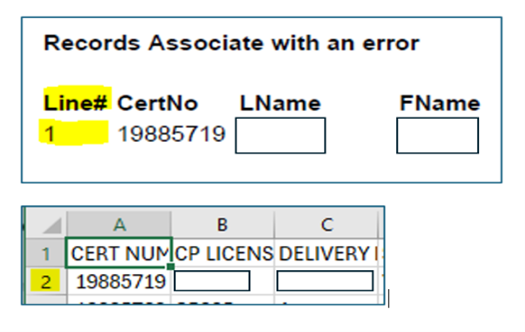
- When looking at your error report, the spreadsheet column headers are on Row 1 and are not accounted for under the “Line #” column. Use that “Line #” and add 1 to find the affected row in your spreadsheet. Please see example below:
Questions/Concerns If you’ve gone through the training review guide and still are unable to successfully upload your certificate completion data, or have a question about the process, please send an email to the Education and Examination Division webform with the following information:
- Driving Safety Provider name and license number
- Attach a copy of the CSV file that you are attempting to upload
- Attach a copy of the report that details the error information